
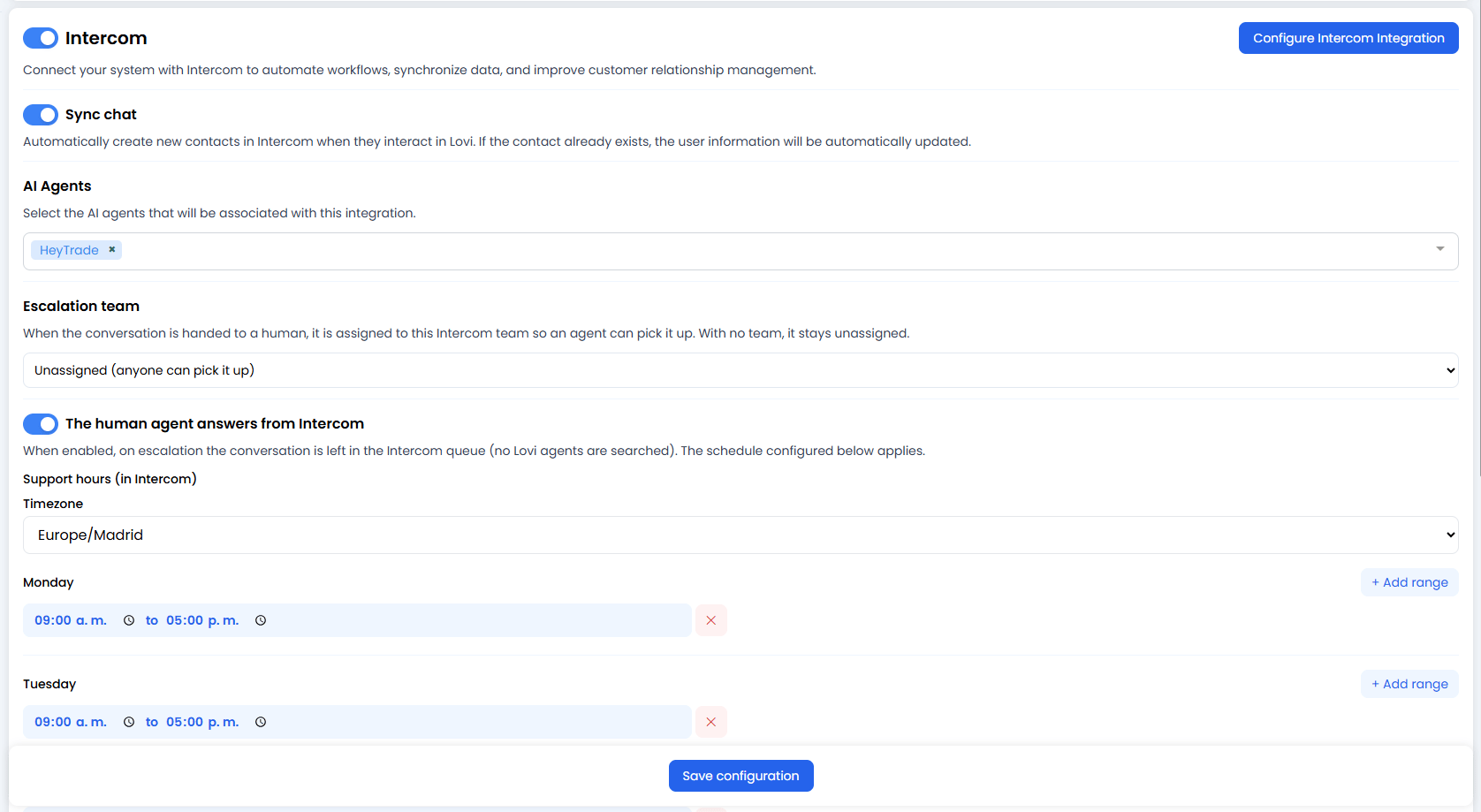
🔌 1. Intercom Configuration
The top toggle enables or disables the entire Intercom integration. To connect (or reconnect) your Intercom account, click the blue button in the top-right corner: [Configure Intercom Integration] This will open Intercom’s authorisation flow (OAuth), where you can:- Log in to Intercom.
- Select the correct Workspace.
- Authorise Lovi to read and write messages.
🔄 2. Sync Chat (Contact Synchronisation)
When enabled, this option automatically creates new contacts in Intercom whenever they interact in Lovi.- If the contact doesn’t exist: It is created automatically in Intercom.
- If it already exists: The user information is automatically updated with any new data from the conversation.
- Benefit: Your Intercom workspace stays in sync with every conversation handled by the AI — no manual data entry required.
🤖 3. AI Agents
Select which AI agents will be associated with this Intercom integration.- Use the dropdown to pick one or more agents (e.g.
HeyTrade). - Only conversations handled by the selected agents will be synchronised with Intercom or eligible for escalation.
- This is useful when you have multiple agents and only want certain ones to interact with Intercom.
👥 4. Escalation Team
When a conversation is handed to a human, it is assigned to the Intercom team you select here so an agent from that team can pick it up.- Use the dropdown to choose an Intercom team.
- If no team is selected, the default option is Unassigned (anyone can pick it up) — meaning the conversation will appear in Intercom’s general queue for any available agent.
- Use case: If you have specialised support teams in Intercom (e.g. “Sales”, “Billing”, “Technical”), you can route escalated conversations to the right group automatically.
💬 5. The Human Agent Answers from Intercom
When this toggle is enabled, escalated conversations are left in the Intercom queue instead of searching for available Lovi agents. This means your human agents will answer directly from within Intercom. This option also unlocks the Support hours scheduler, which lets you define when your human team is available:Support Hours Configuration
-
Timezone: Select the timezone that applies to your team’s schedule (e.g.
Europe/Madrid). -
Daily time ranges: For each day of the week (Monday through Sunday), you can:
- Click + Add range to define a working window (e.g.
09:00 a.m. to 05:00 p.m.). - Add multiple ranges per day if your team works split shifts.
- Remove a range by clicking the ✕ button next to it.
- Leave a day empty (no ranges) to indicate that no human support is available on that day (e.g. weekends).
- Click + Add range to define a working window (e.g.
- What happens outside support hours? When a conversation is escalated outside the configured hours, the AI Agent continues handling it (or the conversation is queued until a human is available, depending on your flow configuration).
🔗 6. Connection Status
At the bottom of the configuration section you’ll see the connection details:- “The account is connected” — Confirmation that the integration is active. ✅
- Account name: Shows exactly which Intercom environment you’re connected to (e.g.
HeyTrade). Extremely useful if you manage test environments (Staging/Dev) and production (US/EU), so you don’t accidentally send real data to a test workspace. - Region: Where your data is hosted (e.g.
USfor United States). Important for privacy and compliance requirements (such as GDPR).
💾 7. Save Configuration
Once you’ve configured your toggles, agents, escalation team, and support hours, click Save configuration to apply all changes.🎯 Why connect this at all?
The main goal is synergy:- Seamless handoff: Your AI Agent handles first-line conversations and, when a ticket is escalated to a human, it can be routed to a specific team and appear directly in your human agents’ Intercom inbox.
- Scheduled availability: Define exactly when your human team is available, so escalations only happen during working hours.
- Centralisation: Keep your human team working in the tool they already know (Intercom), while the AI does the heavy lifting inside Lovi.