> ## Documentation Index
> Fetch the complete documentation index at: https://docs.lovi.ai/llms.txt
> Use this file to discover all available pages before exploring further.
# FAQs Config
> Configure your AI agent's FAQS to responses
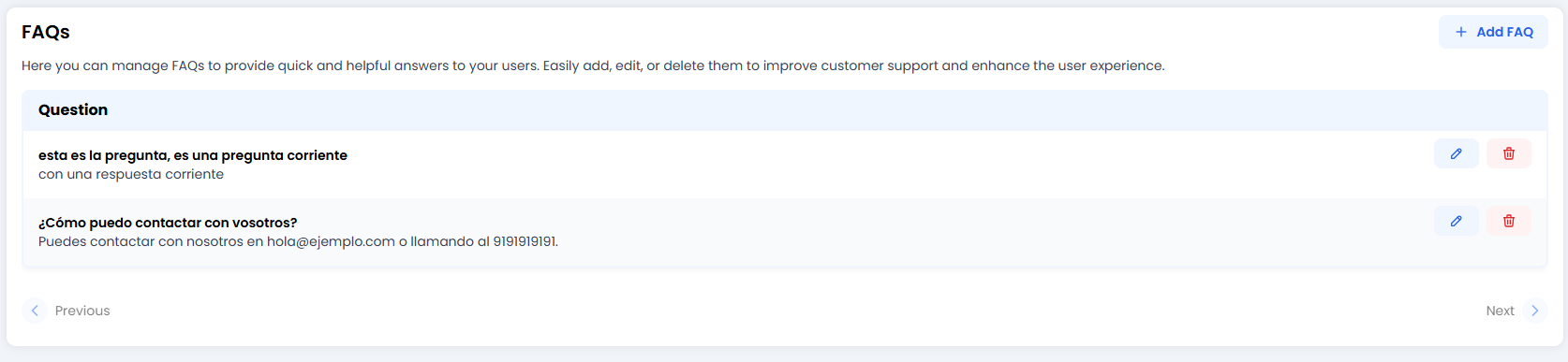 Sometimes you don’t want Artificial Intelligence to “think” or improvise. Sometimes you need an exact, literal and perfect answer. That’s what **FAQs** are for.
They are like your agent’s “memory cards”. If a user asks something specific, the agent will return this answer exactly as you wrote it.
### 🎯 When should you use FAQs instead of General AI?
* **Strict policies:** Returns, warranties or legal terms where you can’t change a single word.
* **Contact details:** Email addresses or phone numbers (you don’t want the bot hallucinating a fake number).
* **Step-by-step instructions:** Guides that require formatting (bold text, lists) to be readable.
***
### ✍️ Creating your first FAQ (The Editor)
When you click **+ Add FAQ** or the edit pencil ✏️, you enter the creation area.
Sometimes you don’t want Artificial Intelligence to “think” or improvise. Sometimes you need an exact, literal and perfect answer. That’s what **FAQs** are for.
They are like your agent’s “memory cards”. If a user asks something specific, the agent will return this answer exactly as you wrote it.
### 🎯 When should you use FAQs instead of General AI?
* **Strict policies:** Returns, warranties or legal terms where you can’t change a single word.
* **Contact details:** Email addresses or phone numbers (you don’t want the bot hallucinating a fake number).
* **Step-by-step instructions:** Guides that require formatting (bold text, lists) to be readable.
***
### ✍️ Creating your first FAQ (The Editor)
When you click **+ Add FAQ** or the edit pencil ✏️, you enter the creation area.
 The editor is split so you have full control:
#### 1. Question
Write the question exactly as a user would ask it.
* *Example:* “How can I contact you?” or “Returns”.
* *Note:* You don’t need to include every variation. The bot’s engine is smart enough to understand “Do you have a phone number?” even if you wrote “How can I contact you?”.
#### 2. Answer (Rich Answer ✨)
Here you have a **Rich Text Editor**. Unlike simple fields, this is where formatting shines:
* **Bold (B):** To highlight what matters most.
* **Lists:** Perfect for steps (1, 2, 3…).
* **Links:** Send users to your website.
* **Tables:** Organise opening hours or pricing.
#### 3. Preview (Split View)
What you see is what you get! On the right (or below, depending on your screen), you’ll see a preview exactly as your customer will read it. It updates in real time as you type.
***
### 🎓 Best Practices Summary (Cheat Sheet)
To keep your FAQs useful and not a wall of text:
* **✂️ Keep it short:** Nobody wants to read War and Peace in a chat. If the answer is long, add a summary and a link to “Read more on our website”.
* **🎯 One topic per FAQ:** Don’t mix “How to buy” with “How to return”. Create two separate FAQs.
* **🎨 Use formatting:** A big block of plain text is intimidating. Use **bullet points** or **bold text** for quick scanning.
* **🧹 Clean up:** If you paste text from Word or PDF, always check the *Preview* to make sure the formatting hasn’t broken.
***
### 🚀 Ready-to-copy Examples
**Example: Contact (Direct)**
> **Q:** How do I contact support?
> **A:** You can email us at **[hello@example.com](mailto:hello@example.com)** 📧 or call us on **0191 919 1919** (Monday to Friday, 9am–6pm).
**Example: Password Change (With Steps)**
> **Q:** I’ve forgotten my password / change password
> **A:** To reset it:
>
> 1. Go to **My Account**.
> 2. Click on *Security*.
> 3. Select “Change password” and follow the steps.
***
### 🆘 Quick Troubleshooting
| Problem | Likely Fix 🔧 |
| :------------------------- | :------------------------------------------------------------------------------------------------------ |
| **The bot ignores my FAQ** | Check whether the “Question” is too different from what users actually say. Try making it more generic. |
| **Formatting looks odd** | Copy/paste can bring hidden “junk”. Use the “Clear formatting” button or type directly in the editor. |
| **I have duplicate FAQs** | If two FAQs are very similar, the bot may get confused. Remove the old one or merge them. |
| **Should I use emojis?** | Yes! They make the text feel less robotic and more friendly. 👋 |
All done! With this, you have full control over what your agent says at the key moments. ✅
The editor is split so you have full control:
#### 1. Question
Write the question exactly as a user would ask it.
* *Example:* “How can I contact you?” or “Returns”.
* *Note:* You don’t need to include every variation. The bot’s engine is smart enough to understand “Do you have a phone number?” even if you wrote “How can I contact you?”.
#### 2. Answer (Rich Answer ✨)
Here you have a **Rich Text Editor**. Unlike simple fields, this is where formatting shines:
* **Bold (B):** To highlight what matters most.
* **Lists:** Perfect for steps (1, 2, 3…).
* **Links:** Send users to your website.
* **Tables:** Organise opening hours or pricing.
#### 3. Preview (Split View)
What you see is what you get! On the right (or below, depending on your screen), you’ll see a preview exactly as your customer will read it. It updates in real time as you type.
***
### 🎓 Best Practices Summary (Cheat Sheet)
To keep your FAQs useful and not a wall of text:
* **✂️ Keep it short:** Nobody wants to read War and Peace in a chat. If the answer is long, add a summary and a link to “Read more on our website”.
* **🎯 One topic per FAQ:** Don’t mix “How to buy” with “How to return”. Create two separate FAQs.
* **🎨 Use formatting:** A big block of plain text is intimidating. Use **bullet points** or **bold text** for quick scanning.
* **🧹 Clean up:** If you paste text from Word or PDF, always check the *Preview* to make sure the formatting hasn’t broken.
***
### 🚀 Ready-to-copy Examples
**Example: Contact (Direct)**
> **Q:** How do I contact support?
> **A:** You can email us at **[hello@example.com](mailto:hello@example.com)** 📧 or call us on **0191 919 1919** (Monday to Friday, 9am–6pm).
**Example: Password Change (With Steps)**
> **Q:** I’ve forgotten my password / change password
> **A:** To reset it:
>
> 1. Go to **My Account**.
> 2. Click on *Security*.
> 3. Select “Change password” and follow the steps.
***
### 🆘 Quick Troubleshooting
| Problem | Likely Fix 🔧 |
| :------------------------- | :------------------------------------------------------------------------------------------------------ |
| **The bot ignores my FAQ** | Check whether the “Question” is too different from what users actually say. Try making it more generic. |
| **Formatting looks odd** | Copy/paste can bring hidden “junk”. Use the “Clear formatting” button or type directly in the editor. |
| **I have duplicate FAQs** | If two FAQs are very similar, the bot may get confused. Remove the old one or merge them. |
| **Should I use emojis?** | Yes! They make the text feel less robotic and more friendly. 👋 |
All done! With this, you have full control over what your agent says at the key moments. ✅