> ## Documentation Index
> Fetch the complete documentation index at: https://docs.lovi.ai/llms.txt
> Use this file to discover all available pages before exploring further.
# Team Management
> Build your dream team: Invite human agents and create AI assistants to manage your conversations.
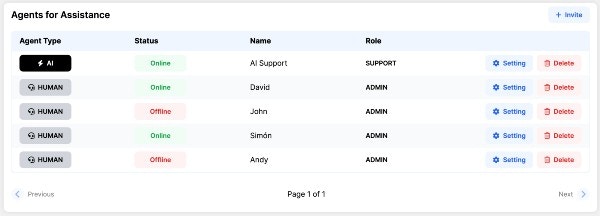 Behind every great platform is a great team. 🦸♂️🤖
This section is your roster. Here you decide who gets to play on the field, whether they are **AI Agents** (your automated bots) or **Human Agents** (your real-life staff who use the Livechat).
***
### 💌 1. Inviting Human Agents
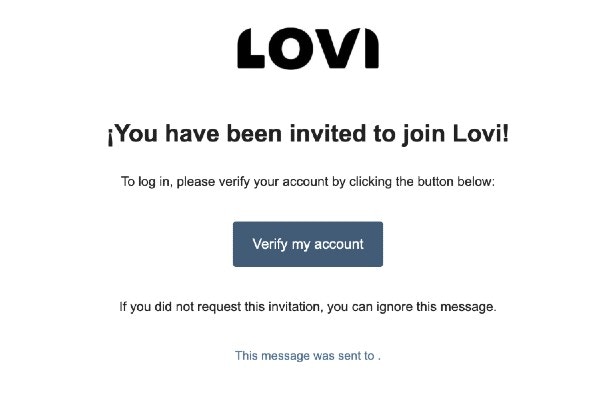
Adding real people to your team is a breeze. Just click to invite a new user, enter their email address, and they’ll receive a magical link to set up their account.
Behind every great platform is a great team. 🦸♂️🤖
This section is your roster. Here you decide who gets to play on the field, whether they are **AI Agents** (your automated bots) or **Human Agents** (your real-life staff who use the Livechat).
***
### 💌 1. Inviting Human Agents
Adding real people to your team is a breeze. Just click to invite a new user, enter their email address, and they’ll receive a magical link to set up their account.
 But before you hit send, you need to decide **how much power** they get.
***
### 🔐 2. Roles and AI Assignments (Who sees what?)
Not everyone needs access to everything. We use a smart permission system based on **Roles** and **AI Agent Assignments** to keep your workspace secure and organised.
Think of your platform as an office building. 🏢
* 👑 **Superadmin:** The owner of the building. They hold the master keys and have **full, unrestricted access** to the entire company's platform, every bot, and every setting.
* 🛡️ **Admin, Supervisor, or Support:** The department managers and staff. **They MUST be assigned to at least one AI Agent.**
**🎯 How the assignment works (The Golden Rule):**
If a user has a role lower than *Superadmin*, their universe is strictly limited to the AI Agents you assign them to. (Don't worry, a single human can be assigned to multiple AI agents if needed).
> **💡 Example:** Let's say you invite an `Admin` and assign them *only* to the AI agent named "Lovi Support". When they log in, they will **only** see the metrics, Livechat conversations, and configurations belonging to "Lovi Support". The "Sales Bot" will be completely invisible to them!
***
### ⚙️ 3. Human Agent Configuration (Fine-tuning)
But before you hit send, you need to decide **how much power** they get.
***
### 🔐 2. Roles and AI Assignments (Who sees what?)
Not everyone needs access to everything. We use a smart permission system based on **Roles** and **AI Agent Assignments** to keep your workspace secure and organised.
Think of your platform as an office building. 🏢
* 👑 **Superadmin:** The owner of the building. They hold the master keys and have **full, unrestricted access** to the entire company's platform, every bot, and every setting.
* 🛡️ **Admin, Supervisor, or Support:** The department managers and staff. **They MUST be assigned to at least one AI Agent.**
**🎯 How the assignment works (The Golden Rule):**
If a user has a role lower than *Superadmin*, their universe is strictly limited to the AI Agents you assign them to. (Don't worry, a single human can be assigned to multiple AI agents if needed).
> **💡 Example:** Let's say you invite an `Admin` and assign them *only* to the AI agent named "Lovi Support". When they log in, they will **only** see the metrics, Livechat conversations, and configurations belonging to "Lovi Support". The "Sales Bot" will be completely invisible to them!
***
### ⚙️ 3. Human Agent Configuration (Fine-tuning)
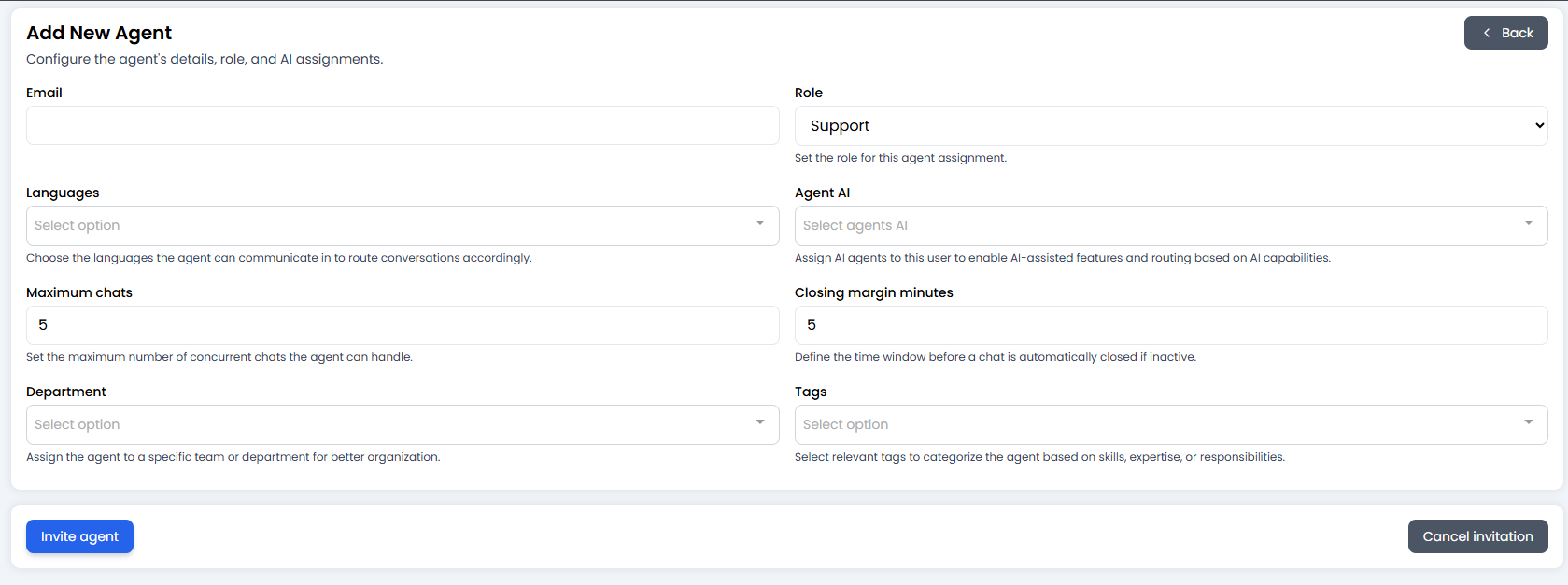 Once you define their role, you need to set up their "working conditions". These settings directly influence how the Livechat auto-assignment system treats them:
* **🤖 AI Agent Assignment:** (Crucial!) Select which bots this person is allowed to manage and view.
* **👥 Group Name:** Assign them to a specific department (e.g., Tech Support, Billing). They will only receive chats routed to this group.
* **🚦 Maximum Chats (Anti-burnout):** What is this person's capacity? If you set it to `3`, the system won't assign a 4th simultaneous chat until they finish one of their active conversations. 🧘
* **⏳ Closing Margin Minutes:** Perfect for shift workers! If you have business hours set up (say, finishing at 17:00), and you set a 5-minute margin, the system will stop giving them new chats at 16:55 so they can wrap up and log off on time.
* **🌍 Languages:** Do they speak French? Spanish? Tag the languages they master so they only receive chats they can actually understand and reply to.
***
### 🎓 Best Practice Summary (Cheat Sheet)
* **Protect the Superadmin role:** Only give this top-tier role to people who absolutely need to see the entire company's billing, global settings, and every single bot.
* **Mix and match:** A single `Support` agent can be assigned to both the "WhatsApp Support Bot" and the "Website Help Bot" if they handle multiple channels.
* **Protect their time:** Always set a realistic *Maximum chats* limit. A human trying to answer 10 people at once is a recipe for angry customers.
***
### 🆘 Quick Troubleshooting
| Problem | Likely Fix 🔧 |
| :-------------------------------------------- | :-------------------------------------------------------------------------------------------------------------------------------------------------- |
| **Agent can't see a specific chat or metric** | Check their AI Agent assignment! If the chat belongs to "Bot A" and they are only assigned to "Bot B", they won't see it. |
| **Agent is not receiving new Livechats** | Check their *Maximum chats* limit (their queue might be full), or check if they are within the *Closing margin* time limit before their shift ends. |
| **I can't save a new Admin or Support user** | Did you forget to assign them an AI Agent? Remember, anyone below Superadmin *must* be linked to at least one bot. |
**Get your team invited, assign their bots, and let the conversations begin! 💬🚀**
Once you define their role, you need to set up their "working conditions". These settings directly influence how the Livechat auto-assignment system treats them:
* **🤖 AI Agent Assignment:** (Crucial!) Select which bots this person is allowed to manage and view.
* **👥 Group Name:** Assign them to a specific department (e.g., Tech Support, Billing). They will only receive chats routed to this group.
* **🚦 Maximum Chats (Anti-burnout):** What is this person's capacity? If you set it to `3`, the system won't assign a 4th simultaneous chat until they finish one of their active conversations. 🧘
* **⏳ Closing Margin Minutes:** Perfect for shift workers! If you have business hours set up (say, finishing at 17:00), and you set a 5-minute margin, the system will stop giving them new chats at 16:55 so they can wrap up and log off on time.
* **🌍 Languages:** Do they speak French? Spanish? Tag the languages they master so they only receive chats they can actually understand and reply to.
***
### 🎓 Best Practice Summary (Cheat Sheet)
* **Protect the Superadmin role:** Only give this top-tier role to people who absolutely need to see the entire company's billing, global settings, and every single bot.
* **Mix and match:** A single `Support` agent can be assigned to both the "WhatsApp Support Bot" and the "Website Help Bot" if they handle multiple channels.
* **Protect their time:** Always set a realistic *Maximum chats* limit. A human trying to answer 10 people at once is a recipe for angry customers.
***
### 🆘 Quick Troubleshooting
| Problem | Likely Fix 🔧 |
| :-------------------------------------------- | :-------------------------------------------------------------------------------------------------------------------------------------------------- |
| **Agent can't see a specific chat or metric** | Check their AI Agent assignment! If the chat belongs to "Bot A" and they are only assigned to "Bot B", they won't see it. |
| **Agent is not receiving new Livechats** | Check their *Maximum chats* limit (their queue might be full), or check if they are within the *Closing margin* time limit before their shift ends. |
| **I can't save a new Admin or Support user** | Did you forget to assign them an AI Agent? Remember, anyone below Superadmin *must* be linked to at least one bot. |
**Get your team invited, assign their bots, and let the conversations begin! 💬🚀**